File Menu
The following functions appear under the File menu.
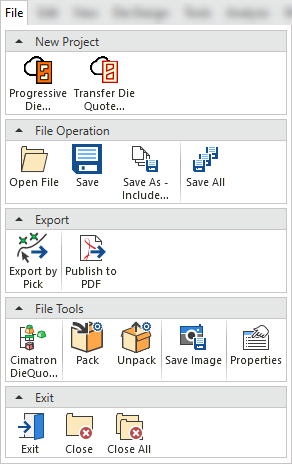
Note: Some options are only available when a file is open.
|
Menu Section |
|
Function |
|
|
|
Close |
Close the current file. |
|
|
|
Close All |
Close all currently open files. |
|
|
|
DieQuote Explorer |
Open the DieQuote Explorer. |
|
|
|
Exit Cimatron |
Close Cimatron and Exit. |
|
|
|
Pack |
Pack (compress) associated Cimatron files into a single Compressed Transfer File (CTF). |
|
|
|
Properties (of File) |
Show the properties of the current file. |
|
|
|
Export by Pick |
Export selected entities to an external file format. |
|
|
|
Publish to PDF |
Publish to PDF to create 3D PDF files that include parts and assemblies from Cimatron. When the Publish to PDF button is selected, a dialog is displayed giving you additional controls before the selected entities are exported to PDF. |
|
|
|
Open File |
Open file(s) using the Cimatron Explorer. |
|
|
|
Setup a new Progressive Die assembly. |
||
|
|
Save |
Save (Ctrl + S) the active file. |
|
|
|
Save As - Copy Include (Dependent Files) |
Save As - copy the main file and all dependent files. |
|
|
|
Save All |
Save all currently open files. |
|
|
|
Save Image |
Save a picture of the current display. |
|
|
|
Setup a new Transfer Die assembly. |
||
|
|
Unpack |
Unpack (extract) Cimatron files from a single Compressed Transfer File (CTF). |


